Raid

wow raid recorder See what happened on the pull.

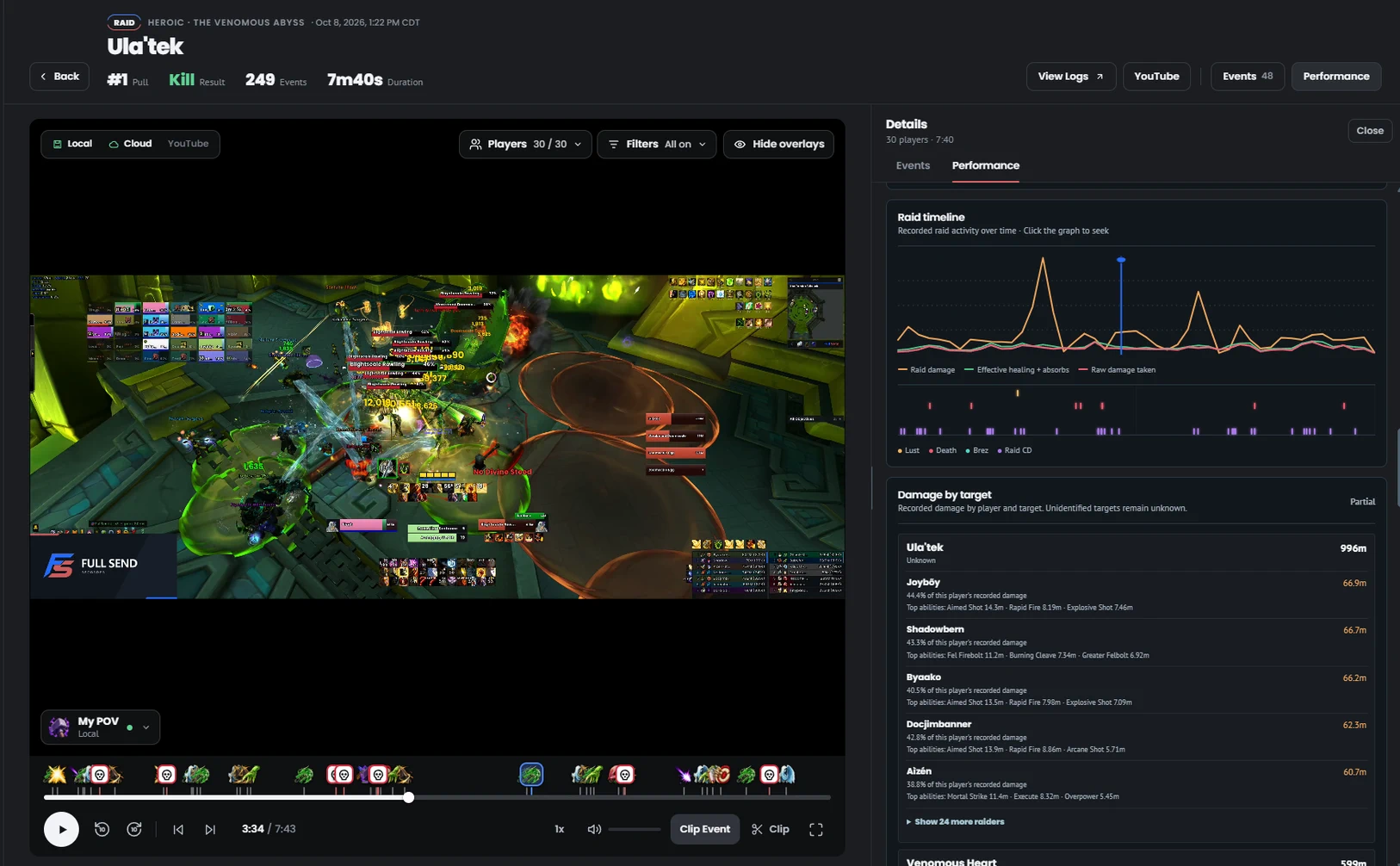
Full Send Recorder records each boss pull in current raids and pairs it with the combat log. Pulls are grouped by night and boss, and every wipe or kill opens with the raid timeline and damage by target beside the video.

A Heroic Ula'tek kill in playback with the raid timeline and damage by target
A Heroic Ula'tek kill with the raid timeline and damage by target.
  • Records every pull
  • Video stays on your PC
  • Raid review needs no account

Short answer

What does a WoW raid recorder do?

It records each boss pull without you starting anything and keeps the video on your PC. Full Send Recorder also reads the combat log, so every pull is filed by raid night, boss and pull, and opens with a raid timeline and damage by target next to the video.

Auto record

Pull the boss. It's already recording.

Turn on Auto record for raids and each boss pull in a current raid is recorded. Recording starts and stops with the encounter, and the pull is waiting in your library when it ends.

The Full Send Companion addon comes with the app and turns on advanced combat logging, so every pull gets its combat log.

  • Grouped by raid night, boss and pull
  • Wipes and kills are both kept
  • Manual record works for anything else

Review

Find out why it was a wipe.

Open any wipe or kill and the raid timeline sits beside the video. Click the graph to jump to that point in the pull.

Damage by target breaks the recorded damage down by player and by target, so you can see who was on the boss and who was on the adds.

Clips

Keep the moment, not the whole night.

Clip Event saves the 10 seconds before and after the event you select. Clip lets you cut your own, up to 60 seconds.

Clips are saved on your PC and the original isn't changed.

Step by step

Set it up once

It takes a few minutes. After that, every pull is recorded.
  1. Pick your game

    Install Full Send Recorder, open Set the Scene and select the World of Warcraft window.

  2. Install the Companion

    Choose your WoW Logs folder and install the addon. This also turns on Auto record.

  3. Pull the boss

    Each pull is recorded and filed under its raid night and boss.

  4. Open the pull

    Check the raid timeline and damage by target, and clip what matters.

Download for Windows

Limits

What it covers

  • Current expansion raids on WoW Retail. Raids from earlier expansions aren't recorded automatically.
  • Manual record works for anything else, without combat log review.
  • Windows 10 and Windows 11 only.
  • Recording, playback, clips and raid review are free. Raid review needs no account and no plan.

FAQ

Common questions

Does it record raids automatically?

Yes. With Auto record on for raids, each boss pull in a current expansion raid is recorded from start to end.

Does it keep wipes, or only kills?

Both. Every pull is kept and grouped by raid night, boss and pull, so you can open any wipe or kill.

Do I need an account or a plan for raid review?

No. Recording, playback, clips and raid review work without an account, and raid review does not need a plan.

Is the video uploaded?

No. It stays in the folder you choose. Video only leaves your PC if you share a clip, upload to YouTube or turn on POV Sync.

Does it record Mythic+ too?

Yes. Every key is recorded the same way, with deaths, missed interrupts, avoidable damage and dangerous casts marked on the timeline.

Free for Windows

Record your next session.

Recording, playback and clips are free. No account needed to start.
Download for Windows